> For the complete documentation index, see [llms.txt](https://docs.dingdoong.io/llms.txt). Markdown versions of documentation pages are available by appending `.md` to page URLs; this page is available as [Markdown](https://docs.dingdoong.io/store-pickup/pickup-scheduling/product-override/set-product-specific-available-dates-and-time.md).
# Set product-specific available dates & time
## **Set product-specific available dates & time**
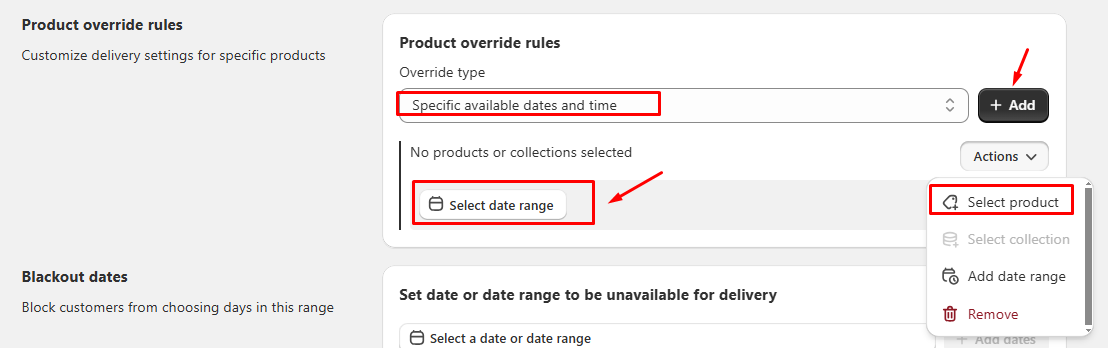
**Step 1**: Go to the **Product Override** section and choose **Specific available dates & time**
**Step 2**: Choose the products you want to apply for the specific available dates & time rule
**Step 3**: Select the date and time of the availability (required). Click on Add to add the timing.
{% hint style="success" %}
If one specific product is activated by both general rules + specific rules (because you add it to both), the app will prioritize the specific rules for this specific product and discard the general rules for it.
{% endhint %}
Let's take a specific example with a flower product:
Suppose there is a general rule that states flowers can be delivered from Monday to Friday, its preparation day is 1, and the delivery date range is 5. So if customers place an order on June 06th (Wednesday). So the available dates customers can choose for delivery are June 7, June 8, June 9, June 12, and June 13 (June 10th: Saturday, June 11th: Sunday).
Now, there is a specific rule set up for a particular flower product (roses) that specifies it can only be delivered on specific dates, such as June 10th and June 25th.
If the particular flower product (roses) is activated by both the general and specific rules, the app will prioritize the specific rule for the roses. This means the roses will be only delivered on June 10th and June 25th, overriding the general rules.